Table of Contents
This is an old revision of the document!
Motor Selection
On this tab you will specify how you want to power the main drive motors as well as the two turret motors (one for turret rotation, and one for turret elevation). As you make your selections in the OP Config program, you will see next to them helpful notes about where to plug in your motor, speed control, or servo. For more information on wiring these devices to the TCB, see the Motors page in the Installation section.
Also on this tab you can set options for the “mechanical barrel,” which means either a mechanical recoil unit or airsoft unit. You can also set options for a recoil servo if you intend to use one instead of mechanical recoil, and finally you will also see options related to smoke units.
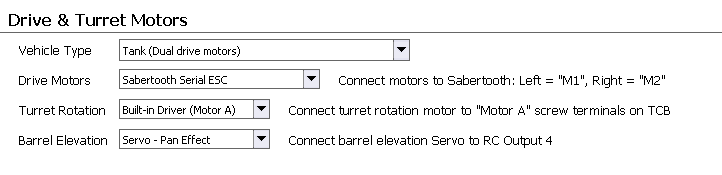
Drive Motor Selection
Vehicle Type
There are three possible vehicle types, each with slightly different drive motor considerations. Select the one that matches your model:
- Tank: Tanks have two independent drive motors. Steering is accomplished through differential control of these motors.
- Halftrack: Halftracks also have two independent drive motors. Steering is accomplished both through differential control of the drive motors, and through a steering servo attached to the front wheels. (The proportion of steering applied to the treads and the servo can be adjusted on the Driving tab under the Turning section.)
- Car: A car has a single drive motor. Steering is accomplished through a steering servo. You could also use this mode for halftrack models that do not have independent tread motors.
If you select Halftrack or Car, you will have a steering servo involved. This servo must be plugged into RC Output 2 (also labeled “Right” on the TCB). In the case of a Halftrack, because the steering servo is occupying the output that would typically be allocated to the “right” tread, the Halftrack drive motors must be driven by a dual-serial motor controller or the onboard motor controllers. In other words, it is not possible to use two hobby ESCs in Halftrack mode (but you can use hobby ESCs in Tank or Car mode).
Drive Motors
This is where you select how you want to power the main drive motor(s). For Tanks and Halftracks, there are always two drive motors, for Cars there is only one. You have three basic options:
- RC Output: Select this if you intend to use a standard RC electronic speed control (ESC), or if you plan to use a continuous-rotation servo as the actual drive motor. The ESC/Servo for the Left tread should be plugged into RC Output 1 (also labeled “Left” on the TCB) and the ESC/Servo for the Right tread should be plugged into RC Output 2 (labeled “Right” on the TCB). If this is a car with only a single drive motor, plug it into RC Output 1.
Note: Almost all ESCs implement a “battery-eliminator-circuitry” (BEC) that provides 5v through the servo plug, typically used to power an RC receiver. Since the TCB already has its own source of 5v power, you MUST remove the middle cable from the connector on any ESC you plug into the TCB (the middle wire is usually red or orange in color). Otherwise the two 5v sources will conflict with each other and you may damage the ESC or the TCB.
If you are using a continuous-rotation servo then you can leave all three wires in the servo cable intact - the TCB will provide 5v power to the servo. But remember, the TCB can only source a total of 3 amps to all 5 volt devices attached, including servos, so only use continuous rotation servos for drive motors on very small and lightweight models (NOT 1/16th scale).
- Built-in Driver: The TCB includes an integrated dual motor controller that can supply up to 2 Amps per motor. Motors are connected via screw terminals labeled Onboard Motors A & B. Again, 2 amps is not sufficient for main drive motors on 1/16th scale models, so only use this option for drive motors on small, lightweight models. The motor for the Left tread should be plugged into Terminal A, and the motor for the Right tread into Terminal B.
- Serial ESCs: The final option for controlling the drive motors is to use a dual-motor, serial ESC. The Dimension Engineering “Sabertooth” models are supported as are the Pololu Qik series. Support for others may be added in time, see the Serial Motor Controllers page in the Installation section for up-to-date information. These ESCs are designed to drive two motors from a single unit, making them ideal for tanks and halftracks. They are controlled with a digital serial protocol that only requires a two-wire cable. Plug this cable into the dedicated connector on the TCB, labelled “Motor Serial.”
Turret Motor Selection
Turret Rotation Motor
The same options exist for the Turret Rotation Motor as for the main drive motors <a href=“#drivemotorlist”>listed above</a>.
Turret Elevation Motor
The Turret Elevation Motor has all the same options as the Turret Rotation motor, with one extra called “Servo - Pan Effect.” This one assumes that barrel elevation will be controlled by a standard, unmodified hobby servo (not a continuous-rotation servo, and not a hobby ESC). The “Pan Effect” describes the way in which transmitter stick movements will be translated to servo movements. If you select the “RC Output” option and use a standard servo, the servo movement will be as you expect - it will match the stick movement. When the stick is at the center, the servo is stationary in the center position. As you move the stick one way or another, so the servo will move one way or another, and return to center when you let go of the stick. With the “Pan Effect” the servo will respond differently. Stick movements will actually be converted to speed commands, not absolute position commands. If you move the stick a very small amount in one direction, the servo will start moving very slowly in that direction and keep moving in that direction until you return the stick to center. Stick centered means “zero speed,” but it does not mean the servo will return to center. For that you will have to move the stick in the opposite direction to bring the servo back. The farther away from center you move the transmitter stick, the faster the servo will move in the specified direction. When the servo reaches its mechanical limit, it will stop. If this explanation is hard to follow you can try both “RC Output” and “Servo - Pan Effect” with a standard servo and quickly experience the difference yourself.
Note: If you do select a servo for turret elevation, you may also want to set custom end-points on your servo travel. But because the radio's turret stick is used for more than direct control of the turret motors, it is not practical to use the transmitter's end-point settings to do so. Never fear, you can do it much more easily using the TCB's servo-setup menu, see the <a href=“http://openpanzer.org/wiki/doku.php?id=wiki:tcb:operation:servosetup”>Open Panzer Wiki - Servo Setup</a> page for more.
Mechanical Barrel
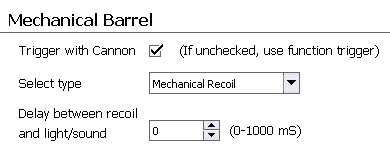 The term “mechanical barrel” refers to the use of either a mechanical recoil unit (such as the Tamiya or Asiatam/Taigen units), or the use of an Airsoft unit. You can not choose both. If you wish to use Airsoft and recoil, use a servo mechanism for the recoil action (<a href=“#servorecoil”>see below</a> for more on recoil sevos).
Trigger with Cannon
If checked, the mechanical recoil or airsoft unit will automatically be triggered when the Cannon Fire function is called. If unchecked, a new function “Fire Airsoft / Mechanical Recoil Unit” will be added to the Function List, which will allow you to trigger the airsoft or mechanical recoil unit manually.
Select Type
Select either Airsoft or Mechanical Recoil. Note: although the TCB is compatible with most popular recoil and airsoft units, some changes in wiring will probably be necessary (Tamiya recoil units are the exception, they are plug-and-play but will need an adapter as they use a non-standard plug). Wiring diagrams and instructions are available on the <a href=“http://openpanzer.org/wiki/doku.php?id=wiki:tcb:tcbinstall:airsoft”>Open Panzer Wiki - Airsoft</a> and <a href=“http://openpanzer.org/wiki/doku.php?id=wiki:tcb:tcbinstall:mechrecoil”>Open Panzer Wiki - Mechanical Recoil</a> pages.
Delay Between Recoil and Light/Sound
This option is only available if you select “Mechanical Recoil” as the type. It allows you to specify a delay in milliseconds (1,000 mS = 1 second) between the time when the barrel recoil unit is activated, and when the flash and sound effects occur. You can use this to more closely synchronize the cannon effect. If you don't need a delay just set the value to 0 and the recoil, flash, and sound will all occur at the same moment.
Servo Recoil
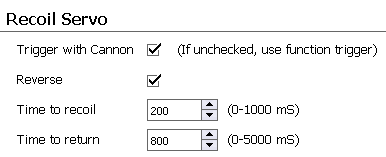 If you prefer to use a servo for barrel recoil instead of the mechanical units, the TCB has you covered. In fact, the servo recoil effect is always active whether you use it or not. Simply plug a servo into RC Output 5 (also labelled “Recoil” on the TCB) and fire the cannon to see it in action. The settings here allow us to precisely control the speed of the recoil and the speed of the barrel's return to battery (“return to battery” means the barrel is fully extended).
Trigger with Cannon
If checked, the servo recoil action will automatically occur when the Cannon Fire function is called. If unchecked, you may still manually initiate the servo recoil action by assigning a trigger to the “Recoil Servo” function.
Time to Recoil:
Set the amount of time the servo takes to “recoil” (pull back) the barrel when the cannon is fired, in milliseconds (1,000 mS = 1 second). This setting might seem a little strange, since many barrels in real life would recoil almost instantaneously. But if you set this value to “0”, your barrel may not recoil at all. Why? Because servos do not move at the speed of light, nor is there any way for the TCB to know what position a servo is currently at, it only knows what position it told it to go to.
The TCB can tell the servo to immediately move all the way to one extreme (ie, recoil), but it will take the servo time to get there. As an example, let's assume a servo takes 150 mS (0.15 seconds) to move from one extreme to the other (this is actually a common value). Then let us assume we set the Time to Recoil to only 50 mS (0.05 seconds). What will happen? When the cannon is fired, the TCB will tell the recoil servo to move to the opposite extreme (recoil). Then, 50mS later, the TCB will start returning the recoil servo to battery position. But since the servo takes 150mS to fully reach the opposite end, it will only have got 1/3 of the way before it starts to return.
Therefore, this setting isn't so much to dictate how fast the servo should recoil - that is a hardware constraint of the servo which can't be changed. Instead, this setting is to tell the TCB how long the servo takes to “recoil” (move from one extreme to another).
Thankfully all servos today are sold with published specifications regarding their speed. Typically it is listed as the time it takes for the servo to rotate 60 degrees at 5 volts under no load. Of course in practice your servo may be moving up to 90 degrees or more, and it will be under a load. So some adjustments to the published figures will need to be made, but a good starting point is to set the Time to Recoil setting = (1.5 x the published 60 degree time) and adjust from there by trial and error. The idea is to keep this number as low as possible while still giving the servo time to fully reach the recoiled position. If you set it too low, the servo won't have time to fully recoil. If you set it too high, the servo will recoil slowly instead of quickly.
Time to Return
This is how long the servo should take to return the barrel to “battery” (re-extend the barrel) after the recoil action. Typically we want this to be a slow movement, so in this case we don't usually need to worry about the servo's max speed. In other words, set this value to the literal time you want your servo to take to return.
Note: Because the recoil servo is not directly mapped to any transmitter channel, there is no way to adjust the recoil servo's end-points or reversing by using a setting on your transmitter. Never fear, you can customize the recoil servo easily using the TCB's recoil servo setup menu: see the <a href=“http://openpanzer.org/wiki/doku.php?id=wiki:tcb:operation:servosetup”>Open Panzer Wiki - Servo Setup</a> page for more.
Smoker
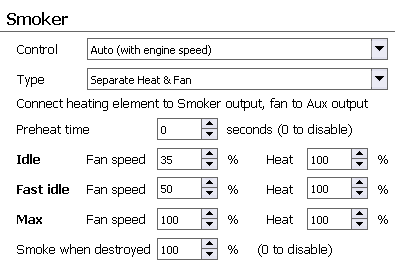 The TCB is compatible with Heng-Long style smoker units or any unit that requires a single variable voltage. You do not need a special “proportional” smoker, the TCB takes care of the smoker speed internally whenever you advance the throttle. For further information on hardware see the <a href=“http://openpanzer.org/wiki/doku.php?id=wiki:tcb:tcbinstall:smoker”>Open Panzer Wiki - Smoker</a> page.
Control
The SMOKER output on the TCB can be controlled in two ways. Automatically by engine speed is what you should use if you actually intend to connect a smoke unit to the TCB. In this control mode the TCB will automatically take care of setting the speed with throttle, turning off the smoker when the engine is off, and applying the idle, fast idle, and max speed settings set below. But if you are not going to use a smoke unit, you can treat the SMOKER output as a general purpose, unidirectional motor speed controller. In Manual mode the output can be controlled with any analog trigger source assigned to the “Smoker - Manual Control” function.
Idle Speed:
This is the minimum smoker speed. The smoker will operate at this speed when the engine is running, the transmission is engaged, and the vehicle is stopped.
Fast Idle Speed:
You have the option of setting a slightly faster idle speed to take effect when the engine is running but the transmission is disengaged. This can serve as a visual indication of the transmission status, and it also mimics the reality that many vehicles do have a faster idle speed when not in gear.
Max Speed:
If at full throttle you think your smoker is running too fast for realism, you can reduce the maximum speed.