Table of Contents
This is an old revision of the document!
Table of Contents
Complete List of Triggers
Turret Stick Triggers
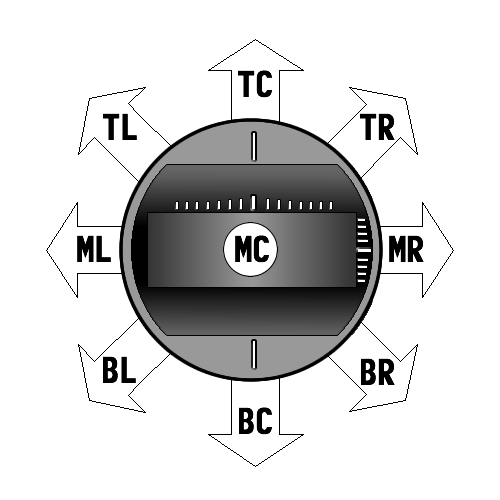 The turret stick is whichever stick on your transmitter you have assigned the turret rotation/barrel elevation movements. This can be the right or left stick depending on your preference. Note it is also possible that you have not assigned these two movements to a single stick - in that case, even though the turret stick trigger will still be available, it simply won't work.
By using the turret stick as a source of triggers, you can actually perform quite a few actions even if you only have a 4 channel transmitter (meaning, no channels other than the two sticks). Of course, using switches and knobs typically works better if you have them.
The turret stick has 9 positions that can be used as a trigger source - the four corners, the four ends, and stick centered.
- TL = Top Left
- TC = Top Center
- TR = Top Right
- ML = Middle Left
- MC = Middle Center (stick centered)
- MR = Middle Right
- BL = Bottom Left
- BC = Bottom Center
- BR = Bottom Right
Aux Channels
Every RC stick radio will have at least 4 channels associated with the two sticks. Every channel your transmitter has beyond those 4 we call Auxillary channels and each one is a trigger. If you have an 8 channel radio, the first 4 channels will belong to the sticks, and then you will have 4 more Aux channels: Aux 1, Aux 2, Aux 3, and Aux 4. If you have a 10 channel radio you will have 6 Aux channels, if you have a 16 channel radio you will have 12 Aux channels, etc…
Aux channels can be classified as analog or digital. An example of an analog Aux channel would be a knob or lever on your transmitter. An example of a digital Aux channel would be a switch. The TCB can recognize both 2 and 3 position switches.
For the Aux channels to work correctly you must first run through Radio Setup in OP Config. This is where you specify how many Aux channels you have and what type each one is.
General Purpose Inputs A & B
The TCB has two general purpose I/O ports named A & B. They can be set to input or output on the Lights & IO tab of OP Config. Only if they are set to input will they then appear as triggers.
Much like Aux channels, inputs A & B can be set to either digital (on/off) or analog. You can then attach a switch or a potentiometer to the input as described on the I/O Ports hardware page.
Obviously, unlike the Turret Stick or the Aux channels on your transmitter, these triggers can't be controlled remotely from your radio. But it can still be useful to have a switch or knob physically located on your model to trigger some function on the TCB. You could use a switch to turn on/off the engine for example, or use a potentiometer to adjust the deceleration constraint.